
History
(과거)
기존 Jetson XGA에 ROS2 Humble이 설치되어있고 Raspi에는 ROS1 Melodic이 설치되어있었음
→ ROS버전이 맞지 않음
따라서 Jetson에 ROS1 Neotic을 설치하여 Jetson ↔ Raspi간 ROS 버전을 일치시킴
(현재)
문제는 XGA에서 ROS로 Raspi에게 이동명령을 내려도 로봇이 움직이지 않음
확인해보니 Go1을 움직이기 위해서는 unitree에서 제공하는 SDK를 XGA에 설치해서 unitree에서 제공하는 명령어로만 동작함
프로젝트 목표
OpenVLA 모델을 선정하여 Go1 로봇개에 VLA모델을 적용한다.
그리고 “이리와”(사람을 인식해서 따라오기) 명령어를 사용자가 음성으로 입력하면 동작하도록하는 서비스를 적용시켜야 한다.
Go1 스펙
아키텍처
- Raspberry Pi: 메인 컨트롤러(IP: 192.168.12.1, 192.168.123.161) Ros1 Melodic
- Nano1: 헤드 카메라 처리 (IP: 192.168.123.13)
- Nano2: 사이드 카메라 처리 (IP: 192.168.123.14)
- Nano3(Main): AI 및 바닥 카메라 처리 (IP: 192.168.123.15)
- MCU(Microcontroller Unit): 모터(정밀) 제어PC IP: 192.168.123.10
센서 시스템
- 5개의 스테레오 카메라
- 총 10개의 카메라(헤드 2개, 측면 오,왼 각 2개씩 총 4개, 바닥 아래, 위에 각 2개씩 총 4개)
통신 계층
- 실시간 UDP 통신
Jetson XGA 스펙
Jetson AGX Orin Developer Kit
Arcitecture: aarch64
CPU: 12 core / 12 thread Cortex-A78AE @ 2.2 GHz
GPU: Ampere 2048 CUDA cores + 64 Tensor Cores
RAM: 64 GB LPDDR5
OS: Jetpack 6.2.1 (Ubuntu 22.04 LTS, Kernel 5.15)
Storage: 64 GB eMMC
Swap: 31GB
ROS1 neotic installed
AI Model: OpenVLA
https://www.jetson-ai-lab.com/openvla.html?utm_source=chatgpt.com
PC ↔ Go1 제어방식
두 가지 제어 레벨을 제공
- High-level control
- Go1 Mode: Sport Mode
- 보행, 속도, 턴 등 “행동 단위”의 명령
- UDP(192.168.123.161:8082)로 직접 전송
- 예:
example_walk
Example_walk.py (PC) -> Raspi(Controller) -> MCU -> 모터 - Low-level control
- 모터 각 관절을 직접 토크/속도/위치로 제어
- MCU(192.168.123.10:8007)로 직접 전송
- 예:
example_position,example_torque,example_velocity
Example_position.py (PC) -> MCU -> 모터
두 가지 통신 방식 제공
- UDP 통신
- ROS기반 LCM 통신
1. SDK 방식(UDP)
Python/C++ SDK (PC) → UDP 통신 → Raspi → MCU → 모터- LCM 서버 필요 없음
- ROS 필요 없음
2. ROS 방식(LCM서버 사용)
ROS Node (PC) → LCM 메시지 → sdk_lcm_server → UDP 통신 → Raspi → MCU → Motor
- LCM(Lightweight Communications and Marshalling) 사용 이유
- ROS1은 Linux 시스템에서 실행되므로 정확한 타이밍에 메시지가 전달된다는 보장이 없음
- 제어 명령이 지연되면 로봇이 넘어질 위험
- LCM은 지연편차(jitter)가 매우 낮고 UDP 기반으로 실시간 통신 가능
- LCM 서버 실행 명령어(High-level)
$ roslaunch unitree_legged_real real.launch ctrl_level:=highlevel- HighCmd 기반 LCM 메시지를 UDP로 변환해 Go1에 전송
- ROS 노드는
/go1/HighCmd토픽을 LCM으로 publish
- LCM 서버 실행 명령어(Low-level)
roslaunch unitree_legged_real real.launch ctrl_level:=lowlevel- LowCmd 기반 LCM 메시지를 UDP로 변환
- ROS에서 관절 토크/속도/위치를 직접 제어 가능
Toy Project
1. PC에서 SDK를 사용하여 Go1 제어
- https://github.com/unitreerobotics/unitree_legged_sdk
- Repo에서 다운로드
- SDK는 Jetson에서 직접 UDP패킷을 만들어 Go1에게 보낼수 있는 로우레벨 C++ 라이브러리
git clone https://github.com/unitreerobotics/unitree_legged_sdk.git- Build
$ cd unitree_legged_sdk/
$ mkdir build
$ cd build/
$ cmake ..
$ make -j$(nproc)- 빌드가 완료되면 example_walk가 생긴다.
- 아래 명령어를 실행하면 로봇이 앞으로 간다.
cd /home/{user_name}/unitree_legged_sdk/build
sudo ./example_walk
2. PC에서 Ros를 사용하여 Go1 제어
- https://github.com/unitreerobotics/unitree_ros_to_real
- Repo에서 다운로드
- ROS 메시지(예:
/go1/HighCmd,/go1/LowCmd)를 LCM 메시지로 변환해주는 ROS 패키지 - LCM Server는 이를 다시 UDP 패킷으로 변환하여 Go1 제어 보드(Raspi)에 전송
- ROS 메시지(예:
mkdir -p ~/catkin_ws/src
cd ~/catkin_ws/src
git clone https://github.com/unitreerobotics/unitree_legged_sdk.gitgit clone https://github.com/unitreerobotics/unitree_ros_to_real.gitcd ..
catkin_make- Catkin
- ROS패키지를 실행 가능한 상태로 만들어주는 자돵화 시스템으로 Linux/C++ 프로젝트를 자동으로 빌드하기 위해 ROS 전용 CMake도구를 묶어놓은 것.
- LCM 서버 실행
roslaunch unitree_legged_real real.launch ctrl_level:=highlevel- ROS로 걷는 명령어 실행
$ rosrun unitree_legged_real ros_example_walk- ROS Run
- 패키지 안의 하나의 노드를 바로 실행할 때 사용
- ROS launch
- launch 파일(.launch) 을 읽어서 여러 노드를 한 번에 실행
VLA
- Model: NaVILA(Legged Robot Vision-Language-Action Model for Navigation)
- Navigation + Vision Language Action
- 2024. 12. 5 출간
- ㅇ
제어
터미널 하나를 열어서 Xavier에서 Roscore를 실행한다.
Xavier가 Ros Master.
그리고 터미널 하나를 더열어서 아래 명령어를 입력해준다.
$ rosrun unitree_legged_real twist_sub그리고 난 후에 다시 터미널 하나를 더 열어서 토픽값을 날리면 unitree go 가 움직인다.
jet@ubuntu:~$ rostopic pub /cmd_vel geometry_msgs/Twist "linear:
>   x: 0.0
>   y: 0.0
>   z: 0.0
> angular:
>   x: 0.0
>   y: 0.0
>   z: 0.3" -r 10
프론트 카메라는 Nano와 연결되어있다.
카메라를 보기 위해서 아래 명령어를 치면 에러가난다.
unitree@unitree-desktop:~/Unitree/sdk/UnitreeCameraSdk/bins$ ./example_getRawFrame

(example_getRawFrame:8788): GStreamer-CRITICAL **: 00:08:21.192:
Trying to dispose element pipeline0, but it is in PAUSED instead of the NULL state.
You need to explicitly set elements to the NULL state before
dropping the final reference, to allow them to clean up.
This problem may also be caused by a refcounting bug in the
application or some element.

[ WARN:0] global /home/nvidia/host/build_opencv/nv_opencv/modules/videoio/src/cap_gstreamer.cpp (886) open OpenCV | GStreamer warning: unable to start pipeline

(example_getRawFrame:8788): GStreamer-CRITICAL **: 00:08:21.192:
Trying to dispose element videoconvert0, but it is in PLAYING instead of the NULL state.
You need to explicitly set elements to the NULL state before
dropping the final reference, to allow them to clean up.
This problem may also be caused by a refcounting bug in the
application or some element.

[ WARN:0] global /home/nvidia/host/build_opencv/nv_opencv/modules/videoio/src/cap_gstreamer.cpp (480) isPipelinePlaying OpenCV | GStreamer warning: GStreamer: pipeline have not been created

(example_getRawFrame:8788): GStreamer-CRITICAL **: 00:08:21.192:
Trying to dispose element appsink0, but it is in READY instead of the NULL state.
You need to explicitly set elements to the NULL state before
dropping the final reference, to allow them to clean up.
This problem may also be caused by a refcounting bug in the
application or some element.


(example_getRawFrame:8788): GStreamer-CRITICAL **: 00:08:21.192: gst_element_post_message: assertion 'GST_IS_ELEMENT (element)' failed
에러가 나는 이유는 go1이 켜질때 autostart의 항목이 이미 카메라 스트림을 점유하여 라즈베리파이에 쏘고 있기 때문이다.
이를 사용하기 위해서는 autostart되는 부분의 카메라 이미지를 스트리밍하는 아이피주소를 변경해주면된다.
unitree@unitree-desktop:~/Unitree/autostart/camerarosnode/cameraRosNode$ ls
build  calib.HrC6RP  devel  kill.sh  patch  src  startNode.sh
unitree@unitree-desktop:~/Unitree/autostart/camerarosnode/cameraRosNode$ sudo vim startNode.sh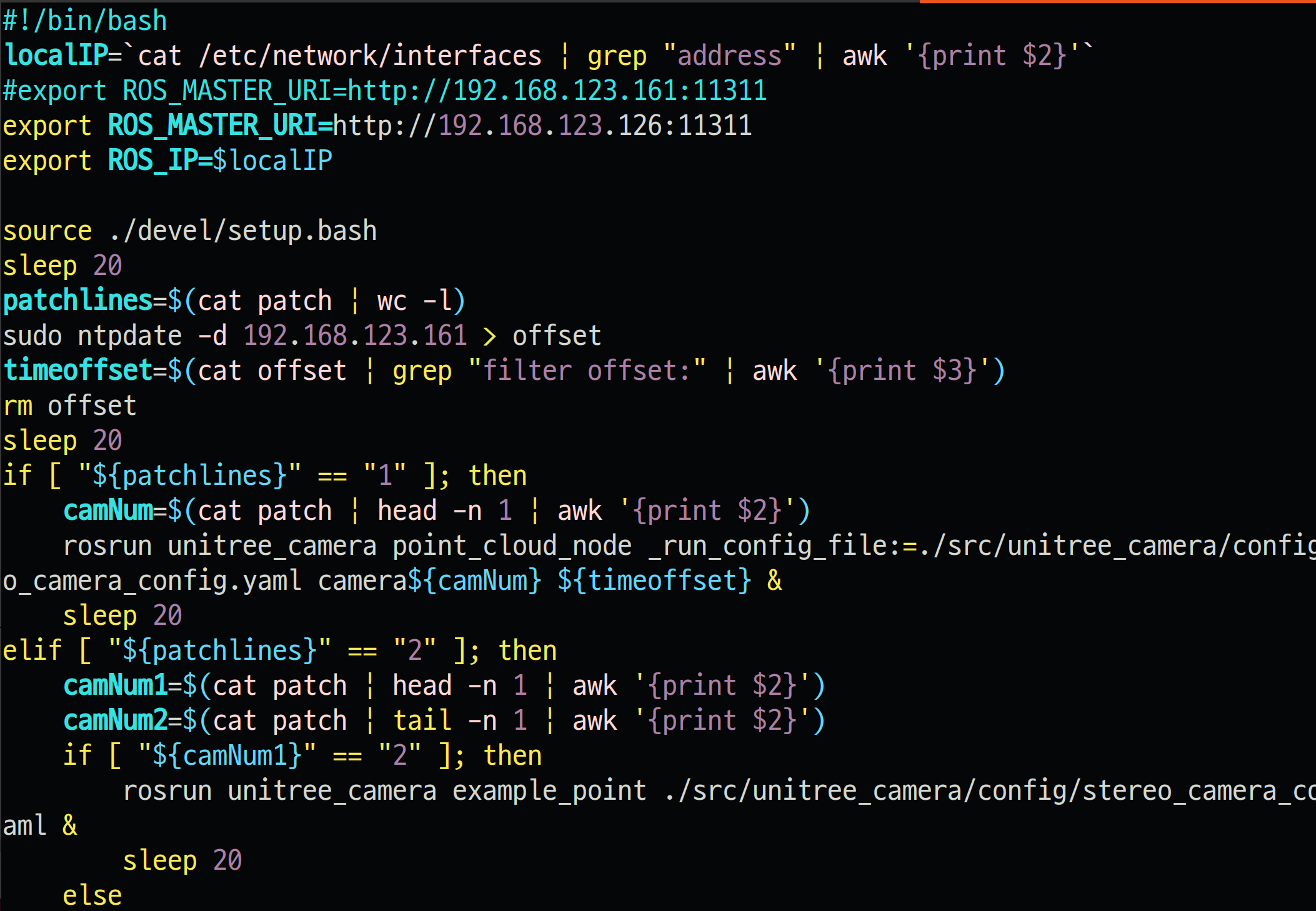
그 다음
cd ~/Unitree/autostart/camerarosnode/cameraRosNode/src/unitree_camera/config/
sudo vim stereo_camera_config.yaml
Comment