
1. What is Context?
컨텍스트(Context)란 특정 도메인(domain)의 노드를 의미합니다. 이 노드에는 해당 도메인에서 수행해야 할 기능들이 포함되어 있습니다.
예를 들어, 로그 컨텍스트(log context)가 있다고 가정해봅시다.
로그 컨텍스트는 로그와 관련된 노드를 의미합니다. 이 로그 컨텍스트 안에는 로그를 터미널에 3번 찍거나 로그 기록을 삭제하는 등의 로그와 관련된 기능들이 담겨 있습니다.
2. Help Information ADT(Abstract Data Type)
로그 컨텍스트는 로그와 관련된 기능을 포함하고 있다고 했습니다.
로그와 관련된 기능이 100개나 1000개처럼 많아진다면, 각 기능이 어떤 역할을 하는지 설명해주는 설명서가 필요할 수 있습니다. 이러한 설명서를 '도움말'이라고 하며, 컨텍스트는 키(key)와 값(value)으로 이루어진 딕셔너리 자료구조로 구성되어 있습니다.
요약하자면, 도움말 자료구조는 컨텍스트 내에 어떤 기능들이 있는지, 그리고 그 기능들에 대한 설명을 사용자에게 제공하기 위해 설계되었습니다.
다음은 로그 컨텍스트의 도움말 예시입니다.
"log": {
    "log_to_console": {
          "description": "output log to the console",
          "usage": "log to console <Contents> <N>",
          "data_type": "str, int",
          "hints": ["Contents", "number of log to print"]
      },
      "log_to_file": {
          "description": "save log to a file",
          "usage": "log to file <FileDirectory> <Contents> <N>",
          "data_type": "str str int",
          "hints": ["FileDirectory", "Contents", "Number of log to write"]
      },
      "delete_log_files": {
          "description": "delete log files from the system",
          "usage": "delete log files <FIleDirectory> <N>",
          "data_type": "str, int: Optional"
          "hints": ["log file to delete: "]
      },
		  "_command":{
				  "common_prompt": "Please input"
      }
}
common_prompt는 _command를 포함하는 컨텍스트의 모든 명령어에 공통으로 사용되는 프롬프트입니다.
예를 들어, log_to_console 명령어가 실행되면 각 hint 요소와 결합되어 사용자에게 다음과 같이 보여집니다.
Please input File Directroy:
Please input number of log to print:
3. Context Hierarchy
각각의 컨텍스트는 도움말을 가지고 있으며, 컨텍스트 간에는 계층 구조가 있을 수 있습니다.
예를 들어, Web 컨텍스트가 있다고 가정해봅시다. 웹을 이용하는 사용자가 존재한다면, 이를 User 컨텍스트라고 할 수 있습니다. 이 경우 Web 컨텍스트 하위 계층에는 User 컨텍스트가 있을 수 있다는 의미입니다.
아래는 Web 컨텍스트가 가질 수 있는 계층 구조의 예시입니다. '컨텍스트'라는 키워드가 없는 단어들은 앞서 설명한 컨텍스트에 속한 기능을 나타냅니다.
아래는 예시를 통해 Web 컨텍스트와 그 하위 계층인 User 컨텍스트가 어떻게 구성될 수 있는지에 대한 예시 입니다.
web context
├── start server
├── user context
│   ├── create user
│   ├── delete user
│   └── update user
├── notice context
│   ├── create notice
│   ├── delete notice
│   └── update notice
└── log context
    ├── log to console
    ├── log to file
    └── delete log files
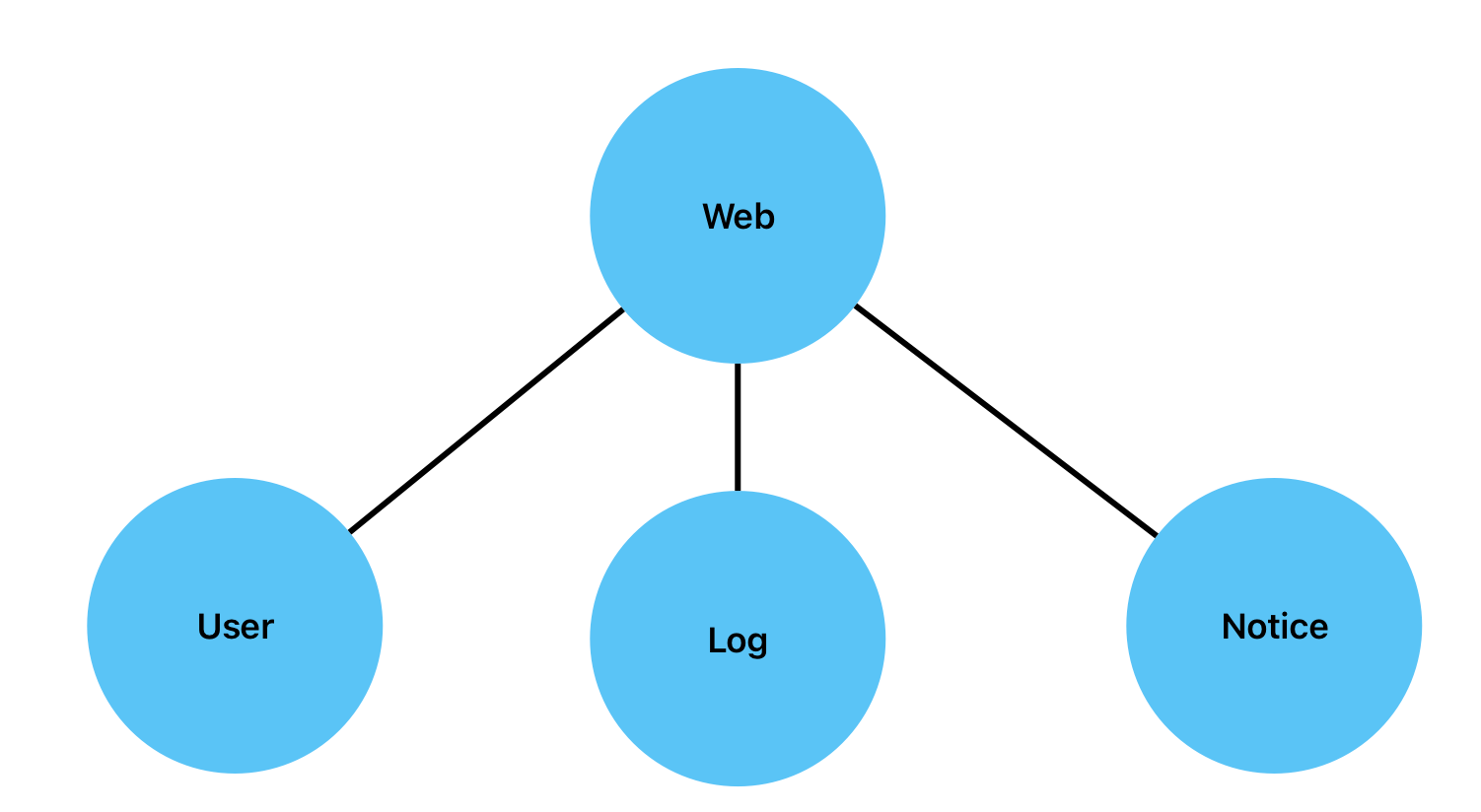
컨텍스트의 계층 구조는 N-ary 트리 방식을 사용합니다.
N-ary 트리는 각 노드가 최대 N개의 자식 노드를 가질 수 있는 트리 구조입니다.
위의 예시를 N-ary 트리로 표현하면 다음과 같습니다.
4. How to Structure Help Information in a N-ary Tree Hierachy
각 노드는 자신의 명령어에 대한 도움말을 가지고 있습니다. 개별 노드가 구성된 후, 이 노드들이 모여 트리를 이루면, 내부적으로 재귀적인 DFS(Depth First Search) 탐색을 통해 루트 노드부터 시작하여 도움말을 계층 구조에 맞게 통합해 나갑니다.
5. How to Combine Nodes through Session Connection
하나의 트리가 완벽하게 구성된 후, 네트워크(세션) 연결을 통해 다른 트리와 결합되는 방법에 대해 소개합니다.
이 기능은 원격지에서 다른 CCMD들을 네트워크 통신으로 제어하기 위해 사용됩니다.
연결 가능한 다른 CCMD의 목록을 가지고 있으며, 연결 명령을 실행하면 연결이 시도되고, 계층 구조화된 딕셔너리가 반환됩니다. 이 딕셔너리를 통해 트리가 병합됩니다.
병합 과정은 다음과 같습니다:
- 동적으로 루트 노드를 생성합니다.
- 딕셔너리 탐색은 재귀적인 DFS(Depth First Search) 방식을 사용합니다.
- 이 방법을 통해 자식 컨텍스트를 동적으로 Node 객체로 생성하고, 해당 컨텍스트에 맞는 명령어 정보를 추가한 후, 부모 노드의 자식으로 추가합니다.
- 새로운 트리가 완성되면, 이 트리의 도움말 정보를 기존 트리의 도움말 통합 방법을 사용해 계층 구조로 통합합니다.
- 기존 트리의 도움말에 새로운 트리 정보를 등록합니다.
- 최종적으로 기존 트리의 루트노드에 1번에서 생성한 루트 노드를 자식으로 추가합니다.
이 과정을 통해 트리 구조가 네트워크를 통해 결합됩니다.
기존 트리의 도움말 예시
{
    "main": {
        "commands": {
            "helps": {
                "description": "show commands list and param",
                "usage": "helps",
                "data_type": "none",
                "hints": []
            },
            "log": {
                "description": "change to log context.",
                "usage": "log",
                "data_type": "none",
                "hints": []
            },
            "ping": {
                "description": "Check if the session is connected.",
                "usage": "ping <session index>",
                "data_type": "int",
                "hints": [
                    "Please input session idx: "
                ]
            }
        },
        "subcontexts": {
            "log": {
                "commands": {
                    "helps": {
                        "description": "show commands list and param",
                        "usage": "helps",
                        "data_type": "none",
                        "hints": []
                    },
                    "show_remote_log_conn": {
                        "description": "Display the address of the remote log server.",
                        "usage": "show_remote_log_conn",
                        "data_type": "none",
                        "hints": []
                    },
                    "alter_remote_log_conn": {
                        "description": "Change the port of the remote log server.",
                        "usage": "alter_remote_log_conn <port>",
                        "data_type": "int",
                        "hints": [
                            "Please input port"
                        ]
                    }
                },
                "subcontexts": {}
            }
        }
    }
}
새로 추가될 트리의 도움말 예시
{
    "0": {
        "commands": {
            "helps": {
                "description": "show commands list and param",
                "usage": "helps",
                "data_type": "none",
                "hints": []
            },
            "restart": {
                "description": "restart",
                "usage": "restart Ai Service",
                "data_type": "none",
                "hints": []
            },
            "config": {
                "description": "change to config context",
                "usage": "aiconfig",
                "data_type": "none",
                "hints": []
            },
            "system": {
                "description": "change context to aisystem",
                "usage": "aisystem",
                "data_type": "none",
                "hints": []
            }
        },
        "subcontexts": {
            "config": {
                "commands": {
                    "helps": {
                        "description": "show commands list and param",
                        "usage": "helps",
                        "data_type": "none",
                        "hints": []
                    },
                    "get_config": {
                        "description": "Displays the service configuration settings.",
                        "usage": "get_config",
                        "data_type": "none",
                        "hints": []
                    },
                    "sim": {
                        "description": "change to aisim context",
                        "usage": "aisim",
                        "data_type": "none",
                        "hints": []
                    },
                    "set_addr": {
                        "description": "Sets the IP address and port for a service. This updates both values simultaneously.",
                        "usage": "set_addr <ip_address>:<port>",
                        "data_type": "str",
                        "hints": [
                            "Please input the IP address and port in the format ip:port"
                        ]
                    }
                },
                "subcontexts": {
                    "sim": {
                        "commands": {
                            "helps": {
                                "description": "show commands list and param",
                                "usage": "helps",
                                "data_type": "none",
                                "hints": []
                            },
                            "get_config": {
                                "description": "Displays the service configuration settings.",
                                "usage": "get_config",
                                "data_type": "none",
                                "hints": []
                            }
                        },
                        "subcontexts": {}
                    }
                }
            },
            "system": {
                "commands": {
                    "helps": {
                        "description": "show commands list and param",
                        "usage": "helps",
                        "data_type": "none",
                        "hints": []
                    },
                    "get_disk_info": {
                        "description": "Reads the information from the disk.",
                        "usage": "get_disk_info",
                        "data_type": "None",
                        "hints": []
                    }
                }
            }
        }
    }
}
병합된 트리의 도움말 예시
{
    "main": {
        "commands": {
            "helps": {
                "description": "show commands list and param",
                "usage": "helps",
                "data_type": "none",
                "hints": []
            },
            "log": {
                "description": "change to log context.",
                "usage": "log",
                "data_type": "none",
                "hints": []
            },
            "ping": {
                "description": "Check if the session is connected.",
                "usage": "ping <session index>",
                "data_type": "int",
                "hints": [
                    "Please input session idx: "
                ]
            },
            "0": {
                "description": "change context to 0 context",
                "usage": "0",
                "data_type": "none",
                "hints": []
            }
        },
        "subcontexts": {
            "log": {
                "commands": {
                    "helps": {
                        "description": "show commands list and param",
                        "usage": "helps",
                        "data_type": "none",
                        "hints": []
                    },
                    "show_remote_log_conn": {
                        "description": "Display the address of the remote log server.",
                        "usage": "show_remote_log_conn",
                        "data_type": "none",
                        "hints": []
                    },
                    "alter_remote_log_conn": {
                        "description": "Change the port of the remote log server.",
                        "usage": "alter_remote_log_conn <port>",
                        "data_type": "int",
                        "hints": [
                            "Please input port"
                        ]
                    }
                },
                "subcontexts": {}
            },
            "0": {
                "commands": {
                    "helps": {
                        "description": "show commands list and param",
                        "usage": "helps",
                        "data_type": "none",
                        "hints": []
                    },
                    "restart": {
                        "description": "restart",
                        "usage": "restart Ai Service",
                        "data_type": "none",
                        "hints": []
                    },
                    "config": {
                        "description": "change to config context",
                        "usage": "aiconfig",
                        "data_type": "none",
                        "hints": []
                    },
                    "system": {
                        "description": "change context to aisystem",
                        "usage": "aisystem",
                        "data_type": "none",
                        "hints": []
                    }
                },
                "subcontexts": {
                    "config": {
                        "commands": {
                            "helps": {
                                "description": "show commands list and param",
                                "usage": "helps",
                                "data_type": "none",
                                "hints": []
                            },
                            "get_config": {
                                "description": "Displays the service configuration settings.",
                                "usage": "get_config",
                                "data_type": "none",
                                "hints": []
                            },
                            "sim": {
                                "description": "change to aisim context",
                                "usage": "aisim",
                                "data_type": "none",
                                "hints": []
                            },
                            "set_addr": {
                                "description": "Sets the IP address and port for a service. This updates both values simultaneously.",
                                "usage": "set_addr <ip_address>:<port>",
                                "data_type": "str",
                                "hints": [
                                    "Please input the IP address and port in the format ip:port"
                                ]
                            }
                        },
                        "subcontexts": {
                            "sim": {
                                "commands": {
                                    "helps": {
                                        "description": "show commands list and param",
                                        "usage": "helps",
                                        "data_type": "none",
                                        "hints": []
                                    },
                                    "get_config": {
                                        "description": "Displays the service configuration settings.",
                                        "usage": "get_config",
                                        "data_type": "none",
                                        "hints": []
                                    }
                                },
                                "subcontexts": {}
                            }
                        }
                    },
                    "system": {
                        "commands": {
                            "helps": {
                                "description": "show commands list and param",
                                "usage": "helps",
                                "data_type": "none",
                                "hints": []
                            },
                            "get_disk_info": {
                                "description": "Reads the information from the disk.",
                                "usage": "get_disk_info",
                                "data_type": "None",
                                "hints": []
                            }
                        },
                        "subcontexts": {}
                    }
                }
            }
        }
    }
}
Comment